Rabu, 26 Maret 2014

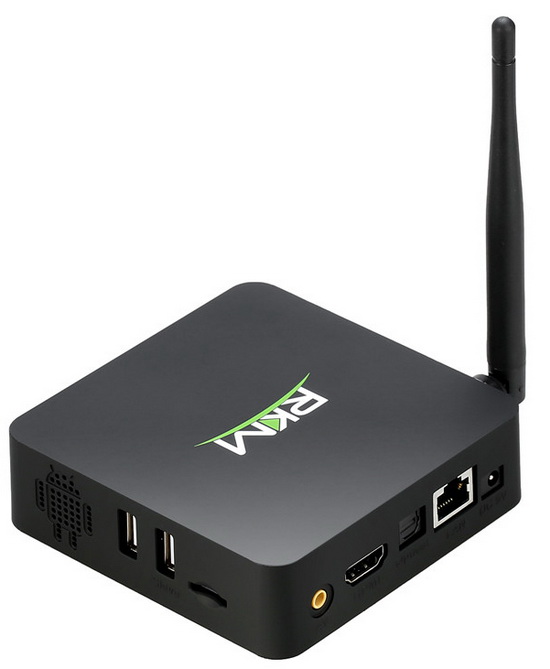
How to unbrick RKM MK902 TV Box


This is only for a soft brick, if you flash by mistake with a different / incorrect / lower firmware or bootloader, etc.

Normally, thanks to full Size slave USB port, Windows 8 and Windows 8.1 driver is installed with no problem at all, and you can see the TV Box as ROCKUSB in Device Manager. 

But if you flash the wrong firmware or the wrong bootloader you can end on Windows 8 / 8.1 with the famous error 'Unknown USB Device' (device descriptor request failed), currently still largely met at ROCKUSB devices with micro USB connector.

To fix that you have to temporarily use a PC with Windows XP just to flash back the correct firmware. Any firmware from this list will do the trick.

Note
If the device is not recognized yet by the PC with Windows XP installed or it looks like it is not powering on, try to connect the power cord to the RKM MK902, then connect the TV Box to the PC via USB cable. If this is only a soft brick, the device should be soon recognized by the PC, then flash back a good firmware from the list above.

More details about RKM MK902 TV Box you'll find here.

Download MK902 User Manual


Download RKM MK902 User Manual from here, here or here. You can also study it below. More details about RKM MK902 TV Box you'll find here.


Download new firmware version 140324 for RKM MK802IV


Download new firmware version 140324 for RKM MK802IV from here, here or here.

What's new 
1. Optimized WiFi performance. 
2. Fixed some MK802IV reboot issue. 
3. Optimized WiFi Display function 

Notice 
Pay attention, this firmware is only for RKM MK802IV with Broadcom AP6210 Wireless/BT chip, it is not intented for RKM MK802IV with RTL8188 Wireless/BT chip (first generation). You can install it on this if you really want, it will work just fine, except WiFi and Bluetooth connections. 

A list with 14 firmwares for Rikomagic RKM MK802IV with RTL8188 Wireless/BT chip you'll find here.

Senin, 24 Maret 2014

New firmware version 140312 for RKM MK802IIIS BT


Download new firmware version 140312 for RKM MK802IIIS BT from here, here or here.

What's new
Optimized WIFI performance

Notice
Pay attention, this firmware is only for RKM MK802IIIS BT with Broadcom AP6210 Wireless/BT chip (see picture above), is not intented for Rikomagic MK802IIIS BT with MTK chip, MT5931 Wifi & MT6622 Bluetooth (first generation, see picture below). You can install it on this if you really want, it will work just fine, except WiFi and Bluetooth connections.

A list with 25 firmwares for Rikomagic MK802IIIS BT first generation you'll find here.


Sabtu, 22 Maret 2014

Photo Gallery: Smic717394 1080 v1.5 Custom ROM installed on RKM MK902 TV Box


Photo Gallery: Smic717394 1080 v1.5 Custom ROM installed on RKM MK902 TV Box
1. Download firmware from here, here or here.
2. Follow this video tutorial to upgrade firmware.


About CSmic717394 1080 v1.5 Custom ROM
- Android Jelly Bean 4.2.2
- Screen resolution: 1920 x 1080 @ 60 Hz 

- Score in new Antutu Benchmark: 18.053 points;
- this firmware is rooted;
- Kernel version: 3.0.36+
- Build number: RKM MK902-eng.smic717394 4.2.2 JDQ39 eng.dl.20140114.112434 test-keys
- Boot version: 2.08
- Miracast support / WiFiDisplay app

- New boot animation
- Changed the default wallpaper
- Changed the pointing arrow
- Removed few extra programs
- Included Beyond XBMC in the pre-installed apps
- Improve performance in video playback and streaming
- Improving Camera Image quality
- NetSpeed Tweaks (buffer size)  


Software included:
- Gapps

- Petrus Reboot App
- MX Player
- No-Frills CPU Control
- Flash Player Settings
- Super User
- Terminal Emulator 


Click on photos to enlarge.
https://farm4.staticflickr.com/3731/13331661905_d3968210fe_b.jpg
 https://farm4.staticflickr.com/3764/13332046294_4604b0d5e7_b.jpg
 https://farm8.staticflickr.com/7355/13331811423_7f8c825b59_b.jpg
 https://farm4.staticflickr.com/3809/13331660545_66489bef24_b.jpg
 https://farm8.staticflickr.com/7255/13331810653_1b5d382de0_b.jpg
 https://farm3.staticflickr.com/2873/13331809793_387f88aa8c_b.jpg
 https://farm8.staticflickr.com/7106/13332044224_8d857c907a_c.jpg
 https://farm8.staticflickr.com/7238/13331658725_db31574f96_b.jpg
 https://farm8.staticflickr.com/7399/13331657675_48936e44d7_b.jpg
 https://farm4.staticflickr.com/3721/13331806773_91c8c1f972_b.jpg
 https://farm3.staticflickr.com/2814/13331656195_1664ced5f0_b.jpg
 https://farm8.staticflickr.com/7364/13331656045_b3c4b10ac9_b.jpg
 https://farm8.staticflickr.com/7187/13331655195_f1ec8f558d_b.jpg
 https://farm4.staticflickr.com/3796/13331655045_4c7c08712d_b.jpg
 https://farm8.staticflickr.com/7330/13332039524_ee1b7ca6d6_b.jpg
 https://farm4.staticflickr.com/3800/13331803153_ecfc7faabf_b.jpg
 https://farm3.staticflickr.com/2840/13331802983_055b266fe4_b.jpg
 https://farm8.staticflickr.com/7339/13331802753_6f2f290b03_b.jpg
 https://farm3.staticflickr.com/2867/13331652505_4eb3999866_b.jpg
 https://farm8.staticflickr.com/7373/13332036964_5fb889caac_b.jpg
 https://farm8.staticflickr.com/7065/13332035984_fef1600578_b.jpg
 https://farm4.staticflickr.com/3798/13331650555_293886751b_b.jpg
 https://farm8.staticflickr.com/7386/13331650415_b7711c4463_b.jpg
 https://farm8.staticflickr.com/7387/13331800183_df4d9c4fec_b.jpg

Jumat, 21 Maret 2014

Photo Gallery: CloudnetGo CR11S 14032014 firmware installed on RKM MK902


Photo Gallery: CloudnetGo CR11S 14032014 firmware installed on RKM MK902 TV Box
1. Download firmware from here.
2. Follow this video tutorial to upgrade firmware.
3. Here you'll find a video review of this firmware.


About 140308 release
- Android Jelly Bean 4.2.2
- Screen resolution: 1920 x 1080 @60 Hz - Score in new Antutu Benchmark: 14.870 points;
- this firmware is not rooted;
- Kernel version: 3.0.36+
- Build number: CR11/S_cloudnetgo_rk31 sdk-eng 4.2.2 JDQ39 eng.dl.20140314.171352 test-keys
- Boot version: 2.13
- Miracast support / WiFiDisplay app


Click on photos to enlarge.
http://farm3.staticflickr.com/2883/13304576753_591dc0f62a_b.jpg
 http://farm4.staticflickr.com/3796/13304571623_160fa496d3_b.jpg
 http://farm8.staticflickr.com/7007/13304781314_8b8a564faf_b.jpg
 http://farm4.staticflickr.com/3748/13304419245_9b169f247c_b.jpg
 http://farm8.staticflickr.com/7407/13304776514_f81d028c9e_b.jpg
 http://farm8.staticflickr.com/7429/13304559673_604514d7aa_b.jpg
 http://farm4.staticflickr.com/3780/13304408865_b1b8acaab7_b.jpg
 http://farm8.staticflickr.com/7275/13304767494_f2f65e2bdd_b.jpg
 http://farm3.staticflickr.com/2807/13304763554_23e0681db4_b.jpg
 http://farm4.staticflickr.com/3694/13304758394_c6d4d2a8fc_b.jpg
 http://farm8.staticflickr.com/7016/13304545763_7b7bae94a1_b.jpg
 http://farm4.staticflickr.com/3783/13304544353_3517274c2a_b.jpg
 http://farm3.staticflickr.com/2875/13304395915_ed121f19c6_b.jpg
 

Photo Gallery: 1080p 140114 Firmware installed on RKM MK902 TV Box


Photo Gallery: 1080p 140114 Firmware installed on RKM MK902 TV Box
1. Download firmware from here.
2. Follow this video tutorial to upgrade firmware.
3. Here you'll find a video review of this firmware.


About 140308 release
- Android Jelly Bean 4.2.2 
- Score in new Antutu Benchmark: 15.000 points;
- this firmware is pre-rooted, for full root acces you just have to install and run SuperSu or Super User from Play Store;
- Kernel version: 3.0.36+
- Build number: RKM MK902-eng 4.2.2 JDQ39 eng.dl.20140114.112434 test-keys

- Miracast support / WiFiDisplay app
- Screen resolution: 1920 x 1080


Click on photos to enlarge.
http://farm3.staticflickr.com/2882/13304509304_363d1382fb_b.jpg
 http://farm8.staticflickr.com/7357/13304144885_86dab4e81b_b.jpg
 http://farm3.staticflickr.com/2806/13304505234_5592b0a6cc_b.jpg
 http://farm8.staticflickr.com/7078/13304438324_20a4ed564b_b.jpg
 http://farm3.staticflickr.com/2840/13304143025_b858304874_b.jpg
 http://farm4.staticflickr.com/3747/13304292883_631520e5f4_b.jpg
 http://farm8.staticflickr.com/7360/13304132825_58634df602_b.jpg
 http://farm8.staticflickr.com/7131/13304281663_7f3a59fc2f_b.jpg